Text Message Alerts
Effective October 17, 2026
SafeChecklist can text the people responsible for a company’s equipment when a pre-shift inspection finds a problem. Texts are an optional paid add-on to a company’s plan; email alerts are always included.
Who can sign up
Supervisors, admins and owners at a company that uses SafeChecklist, each for their own phone. Nobody can sign up someone else’s number.
How you sign up
Sign in, open Account, and under Notifications → Text message alerts enter your mobile number and tick the box, which is never ticked for you. It reads:
Text me SafeChecklist alerts about my company’s equipment at this number. Message frequency varies. Message and data rates may apply. Reply STOP to stop, HELP for help.
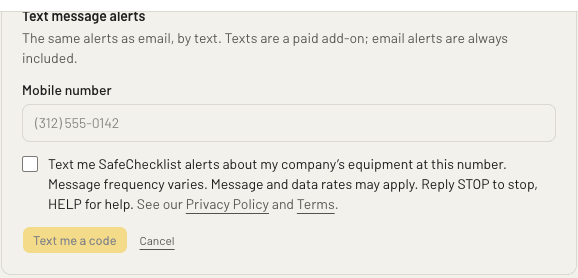
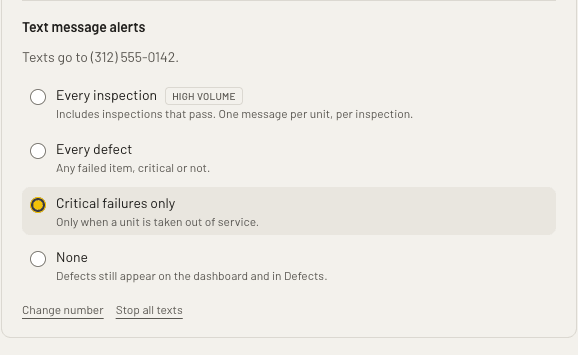
We then text a code to that number. Your number is saved only once you enter the code, which proves the phone is yours. After that you choose which alerts to get, and can change the number or stop texts at any time on the same page:
You will get a text confirming you are signed up. Agreeing to texts is never a condition of using SafeChecklist.
What we send
Alerts about your company’s equipment only, at the level you choose: a unit taken out of service, a failed inspection item, or every inspection. No marketing. For example:
SafeChecklist: Unit 14 OUT OF SERVICE. Brakes failed: “pedal goes to the floor” (J. Ruiz). Reply STOP to stop.
Stopping and help
- Message frequency varies with how many problems your team records.
- Message and data rates may apply.
- Reply STOP to any text to stop them, or use Stop all texts in the app.
- Reply HELP for help, or email support@safechecklist.com.
- Carriers are not liable for delayed or undelivered messages.
We do not sell or share your SMS opt-in data or personal information with third parties for marketing purposes. See the SMS Terms and our Privacy Policy.